
The future of web design isn't AI replacing designers or developers.
It's AI working within the systems teams have already built, accelerating production without generating the maintenance overhead that turns today's speed into tomorrow's technical debt.
The AI website boom
AI offers seemingly effortless solutions. Need an idea of what to cook for dinner? Ask AI. Do you need help touching up your resume? AI can help. Or maybe you want to build a website? AI web design tools can make it happen.
It’s undeniable that AI is useful. OpenAI reports that 75% of its customers use its tools to accomplish tasks they were never able to do before. Anyone can now create a complete website, and all it takes is going through a few prompts and an AI website generator does the rest. And for businesses wanting to launch landing pages, marketing sites, or product pages, AI website tools can generate them almost instantaneously.
OpenAI customers unlocking new capabilities
75% of customers use the product to accomplish tasks they were never able to do before.
But there’s a huge distinction between a website that looks good on the surface and the actual code that’s running beneath. AI website builders work fast, but what happens after a web app is generated?
Prototypes and production systems
Are AI-generated websites merely prototypes masquerading as real websites? Before we discuss how AI web design tools work, it’s important to understand the difference between a prototype and a production system.
A website prototype has the look and feel of a final product, but is incomplete. It's like a wax apple sitting on a plate in a model home, shiny and perfect on the outside, but only a hollow simulation.
Prototype
Idealized vision without technical debt
Production System
Full architecture running at scale
A production system is the entire workflow and infrastructure behind a published website. This includes a CMS for dynamic content, a design system, component libraries, and a workflow that those involved follow.
A prototype may look like it came out of a production system, but it doesn’t have the same well-defined infrastructure behind it.
What AI website builders typically generate
Static code
Most AI website builders hard-code everything into designs. There’s no dynamic content linked to a content management system. Making changes means manually updating what’s on the page.
The same goes for styling. AI web design tools frequently write CSS directly into HTML as inline styles, rather than using a separate stylesheet. This makes global updates tough, as well as hard to manage as a website grows.
Static code is adequate if you have a small website that you’re just going to publish and not worry about. But for something that’s going to scale, code and content need to be structured in ways that are easy to change.
One-off layouts
AI website tools are very 'in the moment'. There's no past, and no future, just an instantaneous moment of creation. The end results are merely output, a mechanical interpretation of whatever it was prompted with. For quick experiments or a personal project, this is fine. But for enterprise companies, where every digital asset is a part of a bigger strategy and defined visual identity, one-off layouts make it hard to stay on-brand.
Non-reusable components
AI website builders often generate fixed layouts with a patchwork of UI elements, inline styles, and hardcoded values for things like colors, padding, and sizing. The markup often feels like a run-on sentence, without clear distinctions between what the code represents.
Component libraries make it easier to maintain a sense of cohesion and avoid having to rebuild the same elements over and over again.
What enterprise companies require from AI website builders
Governance
Small businesses can afford to be scrappy, but bigger brands need tight oversight. Using a CMS or website builder with version control and permissions can prevent just anyone going in and making mistakes that would otherwise be difficult to reverse.
Structured content
“While AI-generated HTML can achieve high validation scores, deficiencies remain in semantic structuring and accessibility, with measurable differences between models.”
Alahmad & Kahtan, Evaluating Generative AI for HTML Development (2025)
A page might look okay, with text following expected sizing and weights, but inconsistent use of headers and other markup, like paragraph tags, can make it hard to interpret. Web crawlers may struggle to analyze what the content is about, and screen readers for those with visual impairments can be thrown off.
Knowing how to structure content is an important task where human logic is essential.
The hidden costs of AI web design tools
AI generated websites can feel homogenous
If you’ve ever used an AI website generator, the output can feel eerily familiar.

This isn’t a coincidence. The models behind these AI web design tools are trained on the same data. Crawling through thousands of websites, scanning the same showcase galleries, and combining every web design trend, what comes out can feel like a photocopy of a photocopy of a photocopy.
Web design used to move in cyclical trends like skeuomorphism, flat design, and Material Design. Each aesthetic a reaction to what came before it. AI models work like a blender, taking all of these trends and setting the switch to pulverize.
Just as excessive em-dashes in writing can be evidence of AI, there are also tell-tale signs of it in web design. In the Y-combinator podcast episode Common Mistakes With Vibe Coded Websites they pointed out how AI website tools tend to favor purple gradients, dashboards, unnecessary hover effects, and icon-adorned cards.
This hits on a valid critique of AI website builders. It’s hard to stand out when everything looks the same.
AI generated websites and code bloat
AI web design tools tend to brute-force layouts that don’t always follow best practices. This can result in redundant markup and inconsistent styling.
For this blog we used Google Stitch, a relatively new AI web design tool still in beta, to generate a SaaS landing page. It defined a Tailwind color palette influenced by Material Design, which is a common look for tech websites.

In many parts of the page, Stitch correctly applied these tokens.

However, in areas like the navigation and footer, tokens were not consistently used.

This leads to a subtle fracturing. The colors represented by tokens like bg-surface and text-on-surface also appear as raw hex values elsewhere in the design. Mixing styling approaches adds unnecessary complexity and code that would make even the most patient designers cranky.
Design systems
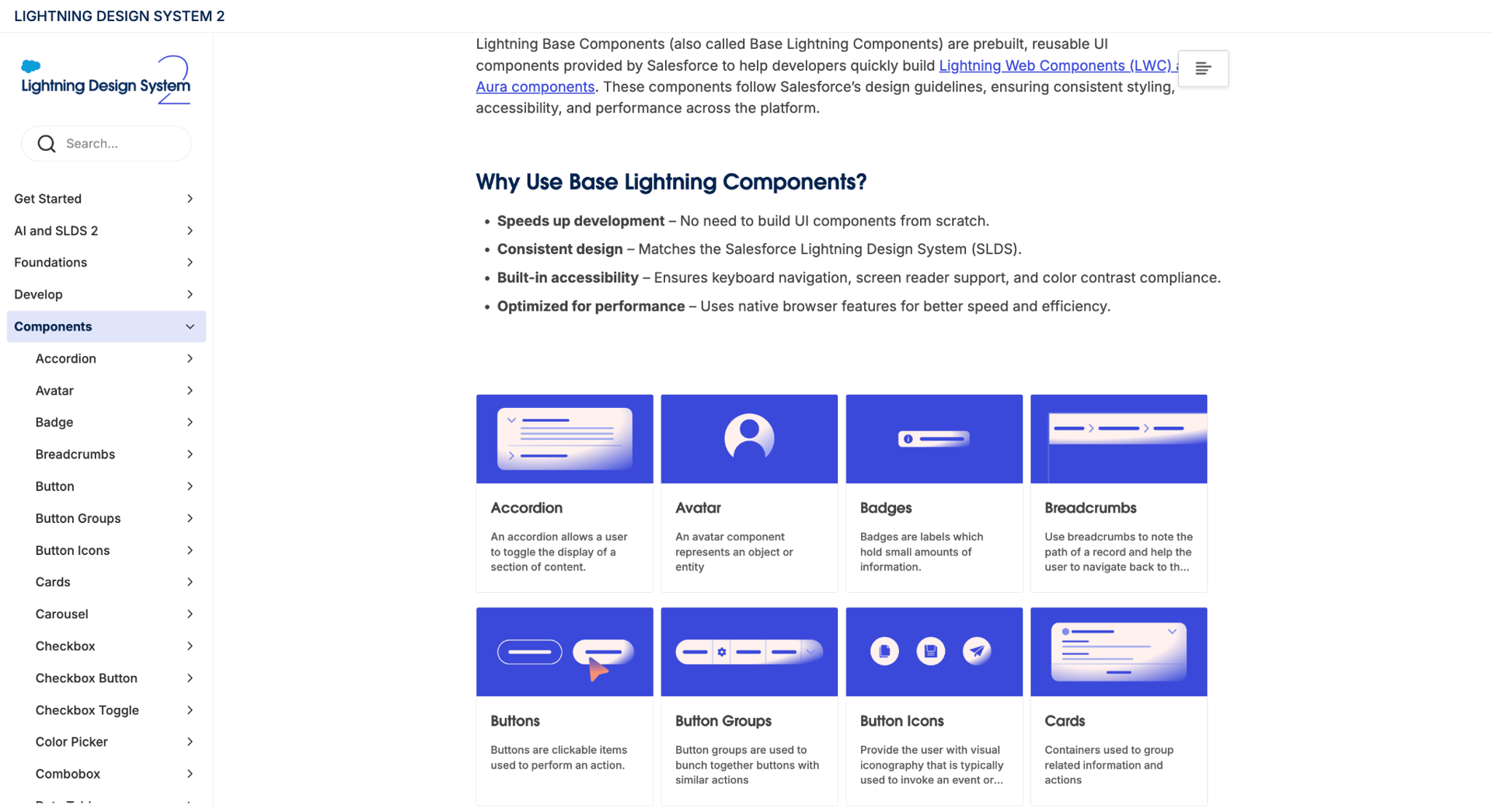
The Salesforce Lightning Design System 2 shows examples of all its components and how they’re used. This is the type of infrastructure that many AI website builders lack.
“If we want AI to help us build a future where the promises of our design systems come true, we have to give it something it can understand. That means rethinking how our systems are structured and maintaining them holistically.”
- Matt Fichtner, Product Design Manager at Figma, The Future of Design System and AI
Design systems bring together all the elements of a web project. They speak in the language of designers and developers, helping teams understand how all the pieces of a web app fit together.
There are a number of AI website builders that are starting to incorporate design system functionality into their workflows. But there still isn’t a solution that offers complete automation.
Brand inconsistency
An AI website generator may replicate the surface of good design, but it can't duplicate the depth of human judgement and artistry.
“Don’t think that there’s a real thing behind it. It’s built from math. It can do good things and bad things. It’s up to humans who want to do good things to do better things for the world.’
-John Maeda, Design in Tech Report 2024: Design Against AI, SXSW 2024
AI website builders can produce work that looks polished and modern. But as Maeda stated, there’s no thought or human taste behind it. Just patterns picked up by the data it’s been trained on. This SaaS landing page we generated in Claude doesn’t look bad at first glance.
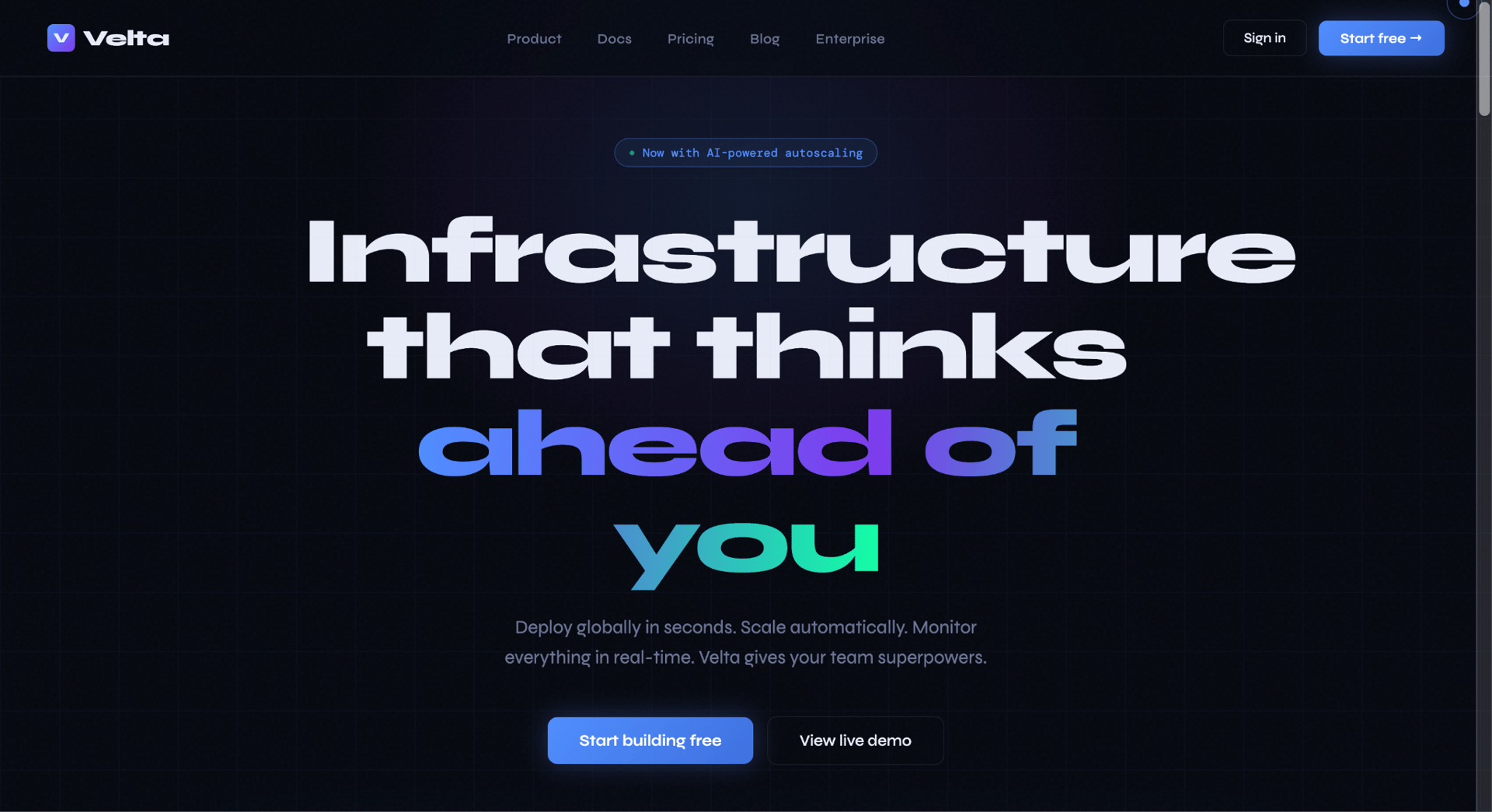
Let’s take the H1. It’s in the Syne typeface, an expressive display typeface, that is a wonderful mash-up of artiness and tech. It is gigantic in scale, and touched by that tell-tale purple gradient the folks at the Y-combinator podcast spoke of. The subheading is also in Syne at a tiny wisp of a size. Oh and the top nav buttons? You guessed it... they’re also in Syne.
Display typefaces are only meant to punctuate a design. Using them for supporting text and UI elements takes away what makes them special and diminishes readability. This doesn’t follow the rules we know for using display typefaces, doesn’t have a strong sense of hierarchy, and looks confusing.
Why enterprises need AI inside infrastructure
AI website builders operate very differently when they’re part of a system than when they're on their own. When used in isolation, they have too much free rein, resulting in problems that someone will have to clean up eventually. When used in conjunction with a design system, structured layouts, Libraries, and shared CSS styles, they accelerate the process.
The shift towards operational AI
Currently, it’s hard to coax AI website builders to create designs that feel unique. AI website design feels like pressing a magic button and hoping for the best. The real leap will be when AI website tools move from being mere standalone apps to those that work automatically within existing workflows, component libraries, and brand guidelines. This is where Vev is taking AI. Vev’s AI features help you deliver responsive, on-brand content faster by building on your design system and creative direction.
The future will be a hybrid process, where AI website tools take care of the busywork, giving teams more time to focus on creativity, and building experiences that feel more warm and human.
How structured platforms are solving this
The platforms gaining traction are those that embed AI inside production systems rather than deploy it alongside them. AI that is brand-aware, system-aware, and connected to the infrastructure that makes content maintainable at scale. Where the output isn't a prototype that someone has to clean up, but production-ready content that teams can actually publish, update, and build on.
Vev is one example of this approach — embedding AI directly into a structured visual production environment, working with reusable components, defined design systems, and existing CMS workflows.